


-
 SUAPP AIR
-
 Release Notes
- /743
 Is there a trial available for SUAPP AIR?
Due to many trial requests, the trial process has been temporarily changed to ensure stability for current members.
Please join our community using the link below. After joining, share your images, models, drafts, or photos in the group. Our support team will help with your trial and answer questions.
Whatsapp: https://chat.whatsapp.com/FfolbR8JYsD6VKgxMQpiM4
Telegram: https://t.me/SUAPP_AI
- /394
What is SUAPP AIR?
“AI gives it form, you give it meaning.”
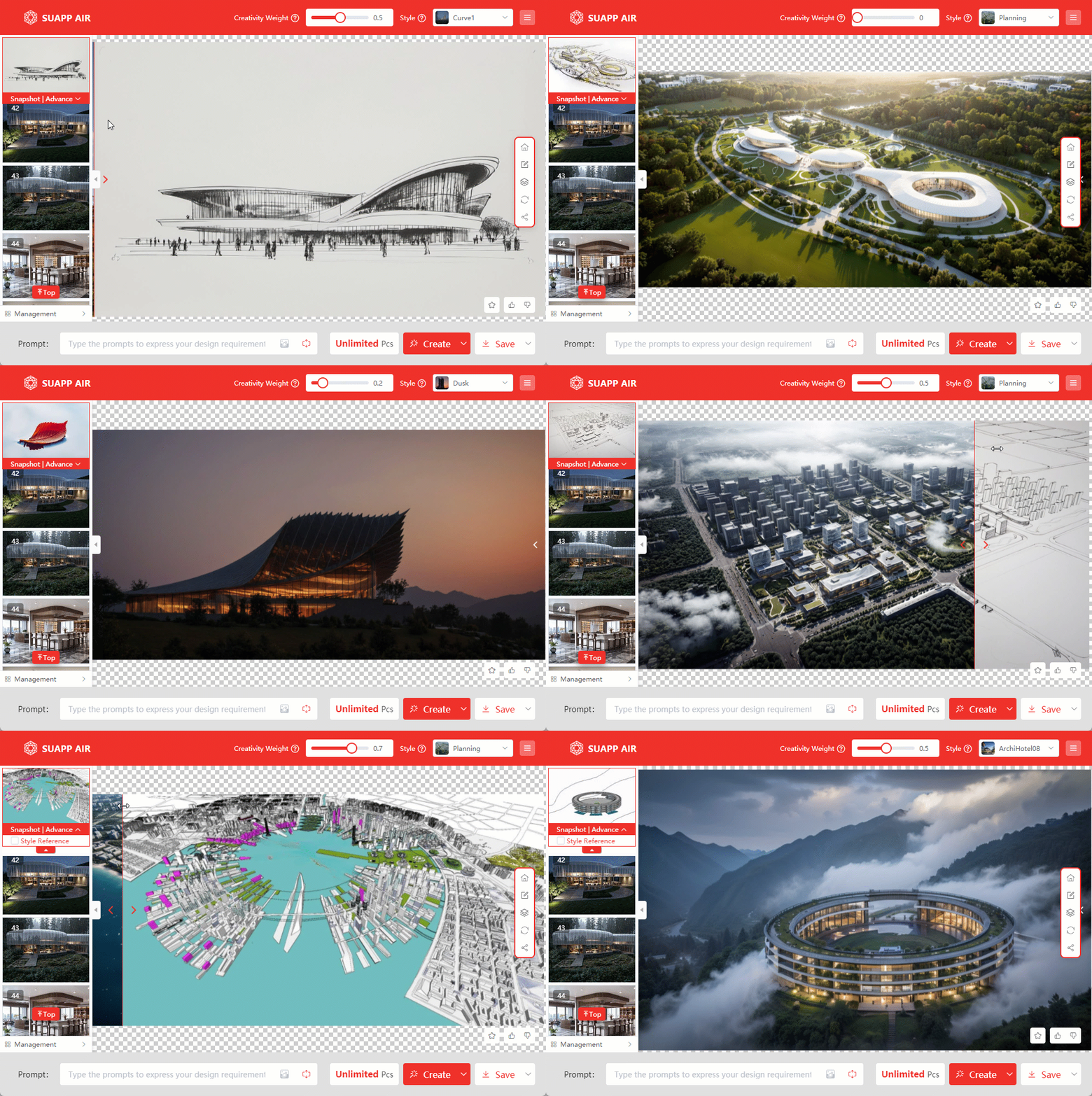
SUAPP AIR (AI Render) is an AI-powered inspirational rendering tool developed by SUAPP. Unlike traditional rendering software, AIR is designed to ignite creativity and provide artistic inspiration rather than generating photorealistic visuals.
With simple parameter adjustments, AIR allows you to quickly generate a “rendered image” that serves as a conceptual reference to support and refine your design process. It is currently applicable to a wide range of fields, including urban design, architectural design, landscape architecture, interior design, plan views, physical models, and hand-drawn illustrations.
AIR is not a conventional renderer—it is a tool for accelerating the exploration of design possibilities.
30s Quick Video Introduction: SUAPP AIR | Quick Introduction
2nd Anniversary Feature Introduction: SUAPP AI 2nd Anniversary
Basic Tutorial, Still Being Updated: Basic tutorial of AIR for SketchUp - YouTube
- /436
How to purchase, download and install SUAPP AIR?
Get Started with SUAPP AIR:
1. Subscribe: Visit https://suapp.ai/member to choose your plan.
2. Integrate: Use SUAPP AIR seamlessly within SketchUp or your preferred design software.
3. Install: Download the plugin from the SUAPP AI website: https://suapp.ai
4. Launch & Create: Open SUAPP AIR in your software, log in to your account, and start designing.
5. Web Access: Enjoy the full SUAPP AIR feature set directly in your browser at https://suapp.ai
Detailed video demonstration: SUAPP AIR | 01 Installation and Registration - YouTube
- /267
Which software does SUAPP AIR support?
1. Plugin version—SUAPP AIR currently supports most major design software, including SketchUp, Rhino (Windows), Revit, 3ds Max, Blender, and Photoshop.
2. Web version—no hardware needed, just log in at https://suapp.ai.
3. Desktop version—available for Windows and Mac
- /126
How long does it take SUAPP AIR to create a result?
Typically, it takes under 20 seconds for most outputs, with the fastest being 5 seconds. Complex editing or animation generation may take up to 1-2 minutes.
- /202
Is there a limit on the number of images SUAPP AIR can generate?
MAX Plan members can generate images without a credit limit while their subscription is active, subject to the applicable fair-use and service terms.
Other plans use a credit system. Each successful generation deducts the corresponding number of credits from your account.
Plan Credits are issued for each monthly billing cycle. They are valid only during that cycle and automatically reset at the beginning of the next monthly cycle. Unused Plan Credits do not roll over.
If you run out of Plan Credits, you may purchase Top-up Credits or wait until your next monthly credit allocation. - /118
Do you offer tutorials or training?
Yes, SUAPP AI provides guides and tutorials through our YouTube channel to help you maximize the tool's capabilities.
- /108
What kind of workflow is SUAPP AIR suitable for?
“AI is powerful, but it’s your design vision that makes the real difference.”
An effective AI tool should enhance creativity, not replace it. SUAPP AIR excels in early design phases—conceptualization, sketching, and planning—offering fast and visually compelling results from models, sketches, drafts, or site photos.
Project Initialization & Design Phase:
● Assist Design Iteration: Real-time rendering while modeling and designing. Refine concepts on the fly.
● Inspire Creative Solutions: Leverage AI to explore diverse spatial layouts and design possibilities.
● Generate Mood & Concept Visuals: Dramatically reduce communication costs with clients, leadership, and rendering studios.
● Create Conceptual Sketches & Visuals: Instantly generate rough models, sketches, and hand-drawn style inspirations, freeing up valuable early-phase time.
● Generate Unlimited Design Variations: Produce numerous design options effortlessly – overwhelm clients with choices.
● Offer Renovation Concepts: Work from site photos; quickly visualize and present multiple renovation directions.
Project Finalization & Delivery Phase:
● Generate Precision Renderings: Produce high-quality renderings in seconds. Effortlessly change weather, time of day, and season – slash post-production costs.
● Enhance Rendering Quality: Elevate realism, texture, and detail to create truly compelling visuals.
● Automate Scene Composition: Generate realistic entourage and scene elements, eliminating tedious manual post-processing.
The Right Tool at the Right Time. Used strategically, SUAPP AIR becomes a powerful ally—enhancing creativity, accelerating workflow, and raising design quality.
- /135
Who owns the images I generate?
You retain full ownership and commercial license to all generated images. We respect your privacy and use the designs solely for generating your requested output. We do NOT use your inputs or outputs to train our AI models.
- /131
What are bar-credits, and how can I use them?
Bar-credits are the currency of SUAPP AI, used for accessing various services such as rendering and editing tasks. Each plan includes a set number of credits monthly. Credits are deducted only for successful tasks.
- /177
Do credits expire, and what happens if I run out of credits?
SUAPP AI has two types of credits:
Plan Credits
Plan Credits are included with your subscription and allocated for each monthly billing cycle. They are valid only during that cycle. At the beginning of the next monthly cycle, your Plan Credit balance resets to the amount included in your plan. Unused Plan Credits do not carry over.
Top-up Credits
Top-up Credits are purchased separately and do not expire.
If you run out of Plan Credits, you can purchase Top-up Credits immediately or wait until your Plan Credits reset at the beginning of the next monthly cycle. You may also upgrade your subscription for a higher monthly credit allowance.
Plan Credits are used before Top-up Credits. Top-up Credits remain in your account if your subscription expires, but an active subscription is required to use them.
- /93
How do I check my remaining credits?
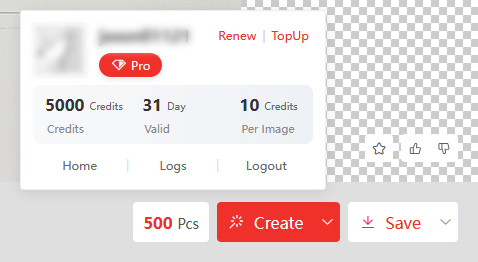
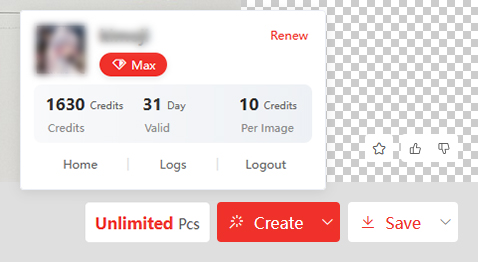
Log in to the SUAPP AI product. You can find your current balance and usage log displayed next to the "Create" button. With a Max plan, you'll enjoy unlimited AI-generated images.
- /143
What payment methods do you accept?
We accept major credit and debit cards such as Visa, Mastercard, and American Express. PayPal is also supported.
- /101
Is my payment information secure?
Absolutely. Payments are processed securely via Stripe and Airwallex, ensuring industry-standard encryption. SUAPP AI does not store your payment details.